FastGPT in Depth: RAG, Workflows, and Self-Hosting
FastGPT is neither a reskinned chat window nor merely a vector-database console. It brings model access, document processing, RAG retrieval, workflow orchestration, debugging, publishing, and operations into one platform so a team can turn an AI demo into a deliverable application.
Teams building a company knowledge assistant, support bot, policy Q&A system, content-review pipeline, or data agent soon hit the same problems: multiple model providers, messy documents, retrieval tuning, business logic that no single prompt can express, and production requirements such as permissions, quotas, logs, and channel integrations.
FastGPT consolidates much of that repeated infrastructure. The project describes itself as an AI Agent building platform; its Community Edition includes the core Agent, workflow, and Dataset features. This guide focuses on how those parts work together, how to deliver a small application, and where the platform does—and does not—fit.
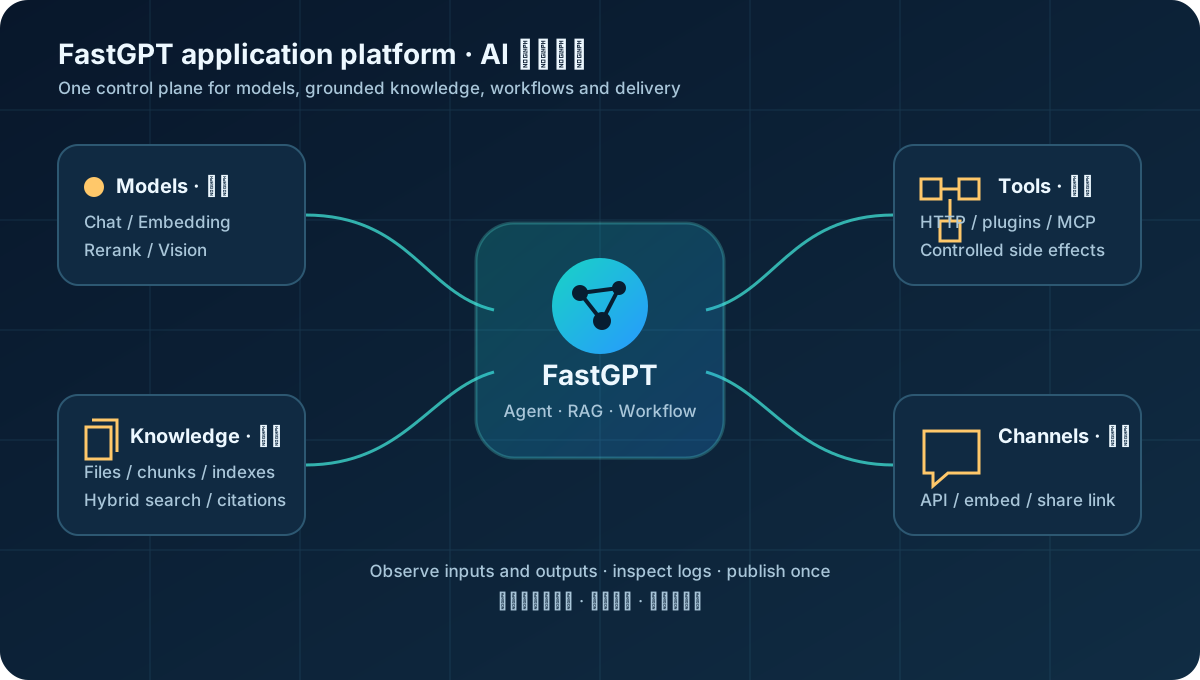
What FastGPT actually is
FastGPT sits in the AI application layer above foundation models. The model understands and generates language; the vector store finds similar content; FastGPT connects both to business processes and exposes the result as a configurable, debuggable application.
| Layer | Problem | What FastGPT adds |
|---|---|---|
| Models | Which chat, embedding, rerank, or vision model to call | Provider configuration and AI Proxy routing |
| Knowledge | How to parse, index, retrieve, and cite documents | Datasets, ingestion, vector/full-text/hybrid search, reranking |
| Orchestration | How to implement a multi-step task | Visual nodes, variables, branches, plugins, and Agents |
| Delivery | How to test, reuse, and ship the result | Debug logs, share links, APIs, embeds, and MCP |
| Operations | Who used it, what it cost, and what failed | Teams, quotas, records, logs, and annotation workflows |
This is useful for developers who want to ship without building an entire RAG and orchestration control plane, and for product or delivery teams that can model a process but do not want to hand-code every backend component.
It is not a quality button. Answer quality still depends on source material, chunking, embeddings, retrieval settings, reranking, prompts, and the chosen model. FastGPT reduces systems work; it does not make poor data disappear.
How the core pieces cooperate
Datasets go beyond “documents to vectors”
During ingestion, a document is parsed, cleaned, chunked, indexed, and stored. At query time, FastGPT can rewrite the query, recall candidates through semantic, full-text, and image paths, fuse ranked lists with RRF, rerank candidates, and then filter the context by relevance and citation-token budget. The details are documented in the official Dataset search guide.
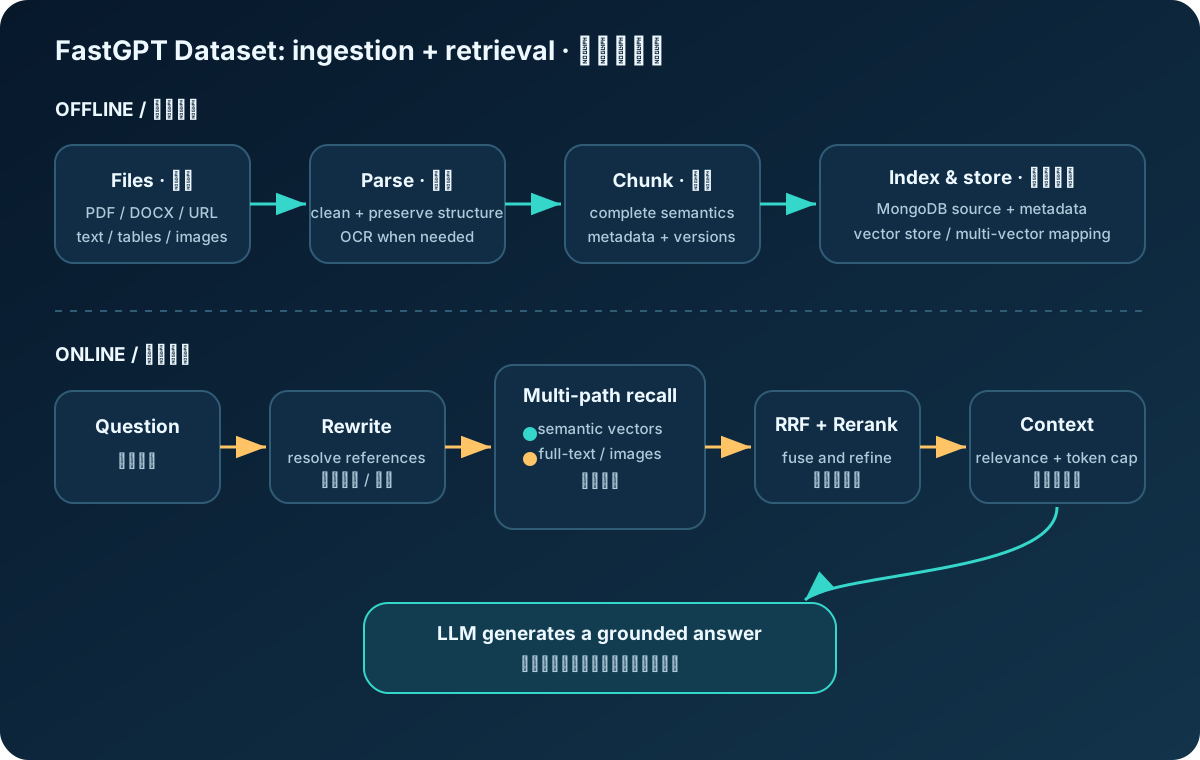
Four design details matter in practice:
- Dataset, Collection, and Data are separate levels. A Dataset is searched as a whole, a Collection groups material much like a file, and Data entries are the units used for Q&A.
- One Data entry may map to several vectors. Several focused indexes can improve recall while still returning one complete source passage.
- Hybrid retrieval is more robust than vector-only search. Exact identifiers benefit from full-text search, natural questions from semantic search, and RRF combines the rankings.
- Citation limits use tokens, not just Top-K. Fixed counts are unstable when chunk lengths differ greatly.
MongoDB holds most non-vector data. Vector data can live in PostgreSQL/PGVector, Milvus, OceanBase, SeekDB, and other supported backends. With PGVector, vector IDs link back to source records in MongoDB, so a complete backup must cover both stores.
Workflows turn prompts into observable programs
A minimal chat needs only an input and an AI Chat node. Real work adds classification, retrieval, HTTP calls, conditions, formatting, and fallback paths. A FastGPT node resembles a function: it has inputs, outputs, and triggers, and later nodes can reference earlier outputs.
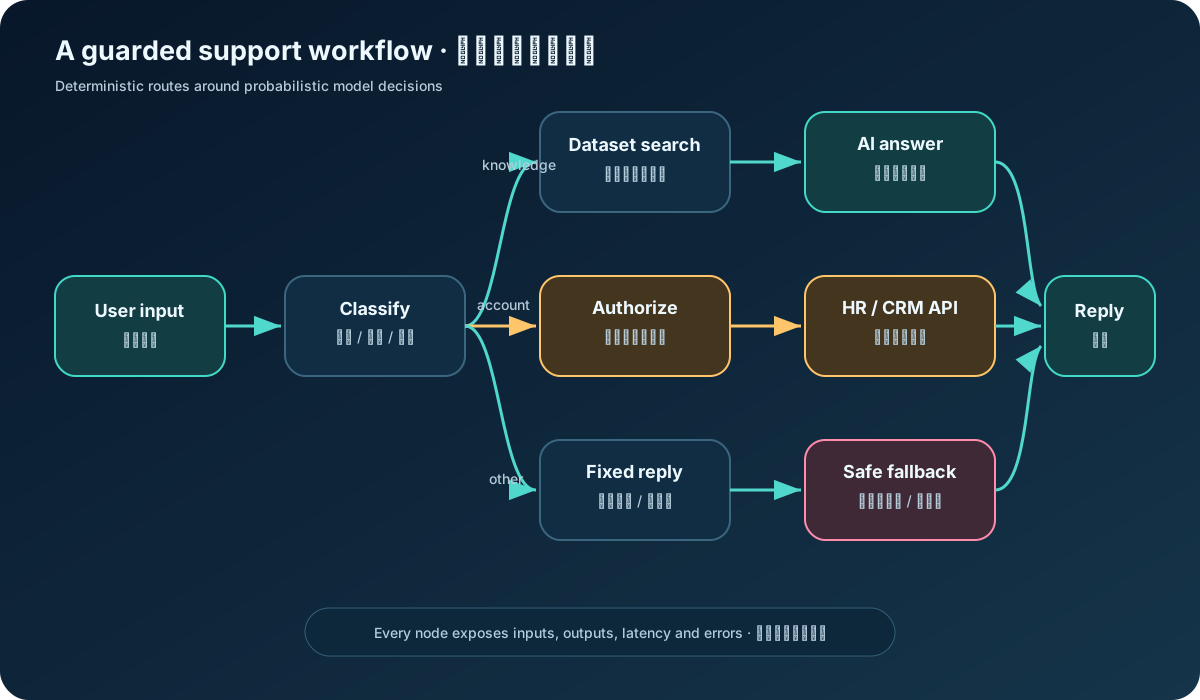
The workflow runtime advances through connection states. A node executes when a predecessor becomes active, waits when a predecessor is still waiting, and skips when nothing can activate it. This makes branches visible and lets operators inspect each node’s inputs and outputs instead of seeing only the final model response.
Keep responsibilities narrow:
| Node | One responsibility | Avoid putting this inside |
|---|---|---|
| Classification | Determine question type | Long-form answers |
| Query Rewrite | Resolve references and complete a search query | Changing exact IDs or product numbers |
| Dataset Search | Recall citable evidence | Final business decisions |
| HTTP / plugin | Fetch live data or perform a controlled action | Hidden, unauditable business rules |
| AI Chat | Synthesize context in the required format | Persistent business state |
| Fixed Reply | Deterministic errors, refusal, or handoff | Open-ended reasoning |
Agents, plugins, and delivery
Workflows are best when the path is known. Agents are useful when the model must plan and choose among tools. Plugins package search, databases, messaging, document processing, and other external capabilities. They complement each other: a reliable production Agent should still constrain sensitive actions to explicit tools and guarded subflows.
Finished applications can be exposed by share link, embed, OpenAI-style API, or MCP Server. API keys are member-level OpenAPI credentials; the current documentation recommends sending appId in chat/completions. Public links consume the owning team’s quota, so use expiration, quotas, authentication, and explicit approval around tools with side effects.
Building an employee-policy assistant
The goal is a grounded assistant that cites company policy, refuses unsupported questions, and uses an internal API only for personal information.
1. Write acceptance questions first. Prepare 20–50 questions covering direct facts, cross-section reasoning, exact form IDs, multi-turn follow-ups, private-data requests, and questions absent from the source set. This becomes the regression suite for every prompt, model, chunking, or retrieval change.
2. Clean the material before tuning thresholds. Remove duplicates and obsolete versions, preserve headings, OCR scanned PDFs, and attach metadata such as department, version, and effective date. Keep each chunk semantically complete. Conditions, exceptions, and conclusions belonging to one rule should remain together.
3. Start with the smallest workflow.
|
|
A useful system instruction is short and testable:
|
|
If form IDs fail, try full-text or hybrid search first. If conversational follow-ups fail, add query rewriting. If the right passages appear but are ordered poorly, inspect reranking. Change one variable at a time and rerun the same test set.
4. Add live data as a separate branch. Policy interpretation should use the Dataset; a remaining-leave balance should come from the HR system after identity and permission checks. Do not periodically embed rapidly changing balances into the vector store, and do not let the model compose unrestricted SQL.
5. Test retrieval, generation, flow, and security. Verify that the correct current policy is recalled; answers remain faithful; timeouts enter a safe fallback; and prompt injection cannot call private tools. A fluent final answer is not enough evidence that the system works.
Self-hosting and production concerns
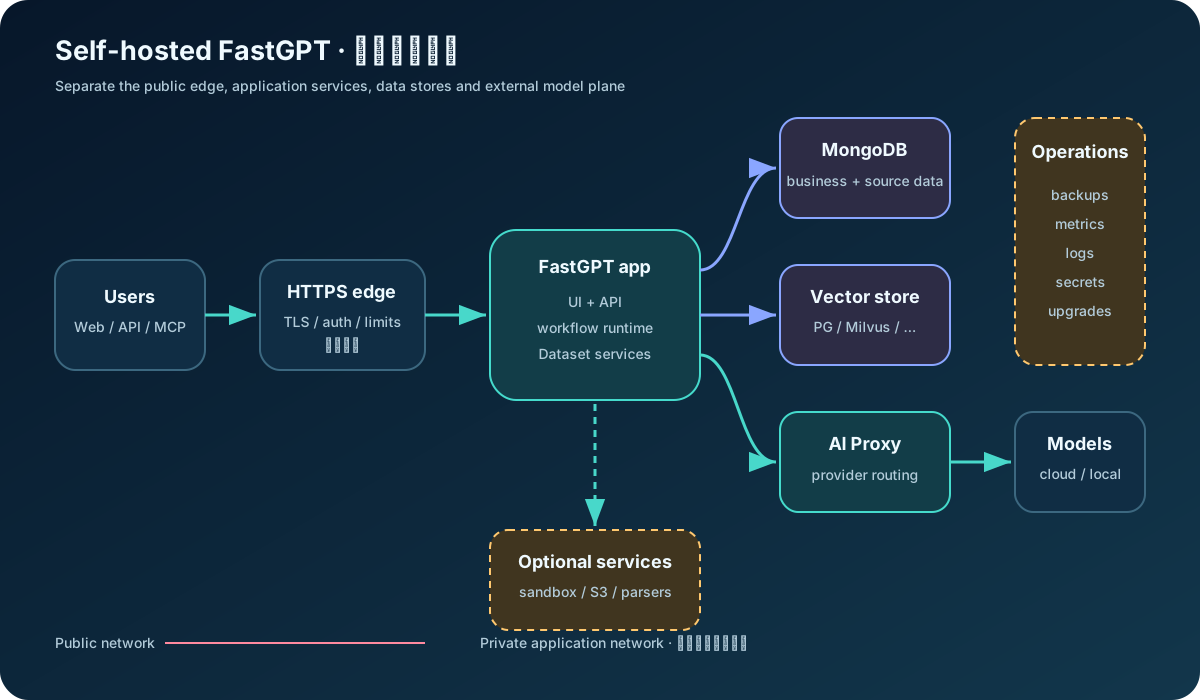
The official Docker Compose architecture includes the FastGPT application, MongoDB, a vector database, and AI Proxy. Agent/Skill sandboxes, object storage, MCP, and advanced parsing can add more services.
The current official installer runs on Linux, macOS, or Windows through WSL:
|
|
The script selects a vector backend, downloads Compose configuration, and generates credentials. For production, download and review remote scripts before execution, retain the generated Compose file and secrets, and pin explicit image versions instead of depending indefinitely on latest.
After deployment, configure the public FE_DOMAIN, add at least a chat model and embedding model in the admin console, and install the required system plugins. Put the service behind an HTTPS reverse proxy and expose only necessary ports.
| Production area | Practical baseline |
|---|---|
| Persistence | Durable volumes for MongoDB, vector data, and object storage; prove that restore works |
| Secrets | Replace defaults; keep model keys, database passwords, and API keys out of Git |
| Network | Never expose databases publicly; restrict egress and apply upload/domain allowlists |
| Upgrades | Read migration notes, upgrade in small steps, back up first, and replay the regression set |
| Observability | Track node latency, model failures, token use, retrieval hits, and refusal rates |
| Capacity | Watch vector count, indexing time, MongoDB growth, concurrency, and provider limits |
Start with the lightest backend that meets measured needs. PGVector is a practical small-to-medium starting point in the official guidance; distributed engines such as Milvus become relevant at much larger scale. Migration includes index rebuilding, downtime planning, performance validation, and backups—not merely copying vectors.
API integration and system boundaries
FastGPT can be the chat UI or sit behind your own web app and collaboration channels. Its OpenAI-style API lowers integration cost, but compatibility does not mean every extension field is identical across versions. Verify against the OpenAPI documentation shipped with your instance.
The shape of a request is:
|
|
Treat FastGPT as an AI decision and generation service, not as the system of record. Orders, balances, and approval results remain in deterministic business systems. For payments, notifications, deletion, or other side effects, add authorization, schema validation, idempotency, and human confirmation rather than trusting model-generated arguments.
Fit, trade-offs, and license
| Scenario | Fit | Why |
|---|---|---|
| Enterprise document Q&A and support knowledge | High | Datasets, citations, workflows, and delivery are integrated |
| Internal process assistants and content review | High | Visual flows connect models, rules, and HTTP tools |
| Delivering several vertical AI apps quickly | High | Models, Datasets, plugins, and templates are reusable |
| A basic model playground | Medium | It works, but may be heavier than necessary |
| Ultra-low-latency inference gateway | Low | Use a specialized gateway and inference stack |
| Transactional core business workflow | Low | LLM orchestration is not a transaction system |
| Competing multi-tenant SaaS | Review first | The license places additional conditions on this use |
Compared with Dify, Coze, Langflow, Flowise, or a custom LangChain/LlamaIndex stack, FastGPT has a clear center of gravity: knowledge-based applications, visual orchestration, and private delivery. Platforms provide speed and consistency; code-first stacks provide maximum control. Choose according to which engineering work the team wants to avoid and which platform constraints it accepts.
Read the license carefully. The FastGPT Open Source License is based on Apache License 2.0 but adds conditions for operating a similar multi-tenant SaaS and for modifying or removing console logo and copyright information. This is not legal advice; check the repository’s current LICENSE before commercial use.
The lasting value of FastGPT is that it makes an AI application buildable, observable, and reusable. Its main risk is making a full canvas look like a finished system. Track retrieval hit rate, groundedness, task success, refusal and handoff rates, P50/P95 latency, cost per successful task, and regression results across every model, prompt, Dataset, and workflow change.
The useful rule is simple: treat FastGPT as an AI application engineering platform, not as a substitute for evaluation. Prove value with the smallest flow, improve retrieval and prompts against a fixed test set, and add Agents and automated actions only when the simpler system has earned that complexity.
This article reflects official material available in October 2026. FastGPT moves quickly, so recheck deployment variables, version dependencies, and API fields before implementation.
Official references: GitHub repository · Community Edition · Workflow runtime · Dataset retrieval · Docker Compose deployment · API publishing