Object, File, and Block Storage: How to Choose in the Cloud
Putting data in the cloud sounds like a matter of finding somewhere to keep it. In practice, the first question is more fundamental: how does the application expect to access that data?
The three most common forms of foundational cloud storage—object storage, file storage, and block storage—all hold binary data. What separates them is how that data is organized, which interface exposes it, and who manages the file system.
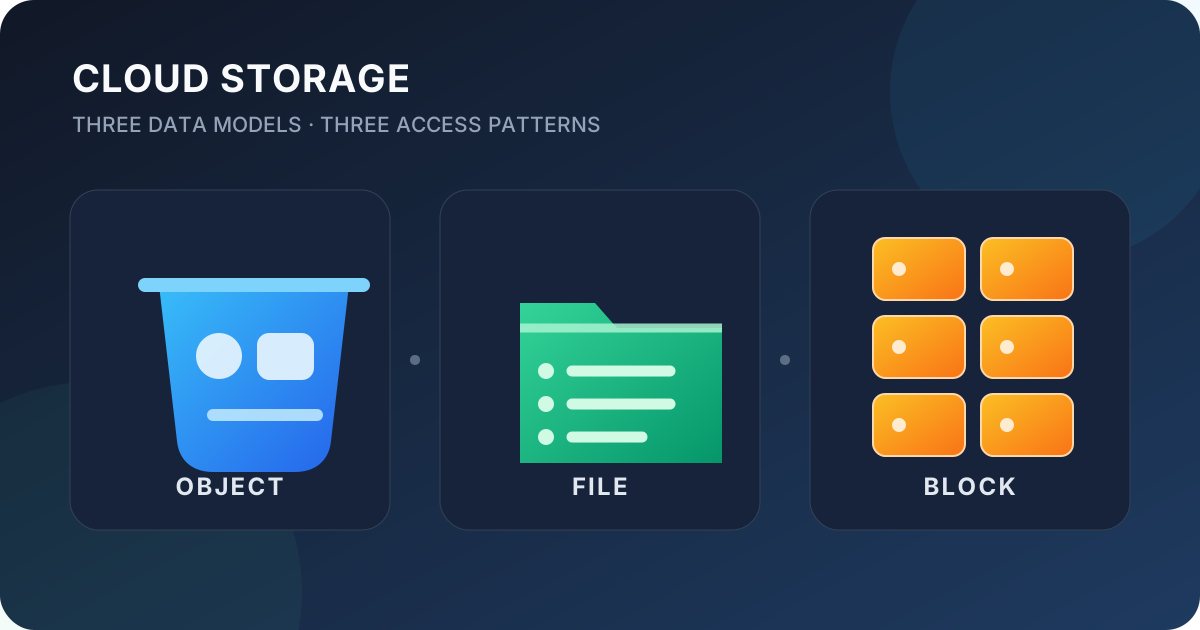
Here is the short version:
| Dimension | Object storage | File storage | Block storage |
|---|---|---|---|
| Basic unit | Object | File and directory | Fixed-size block |
| Common access | HTTP API and SDK | NFS, SMB, and file-system interfaces | A block device attached to an operating system |
| Organization | Bucket and key, usually a flat namespace | Hierarchical directory tree | Block addresses, with no files or directories by itself |
| File system managed by | Storage service | File-storage service | User or operating system |
| Main strength | Massive scale, easy expansion, and high durability | Shared access and compatibility with existing applications | Low latency, control, and frequent random I/O |
| Typical uses | Media, backups, logs, and data lakes | Shared directories, content systems, and workspaces | VM disks, databases, and transactional workloads |
1. What Actually Separates the Three Models?
The three names do not necessarily imply three different kinds of physical disk. The underlying media may be the same HDDs and SSDs—or even the same distributed storage cluster. What changes is the abstraction exposed to the application.
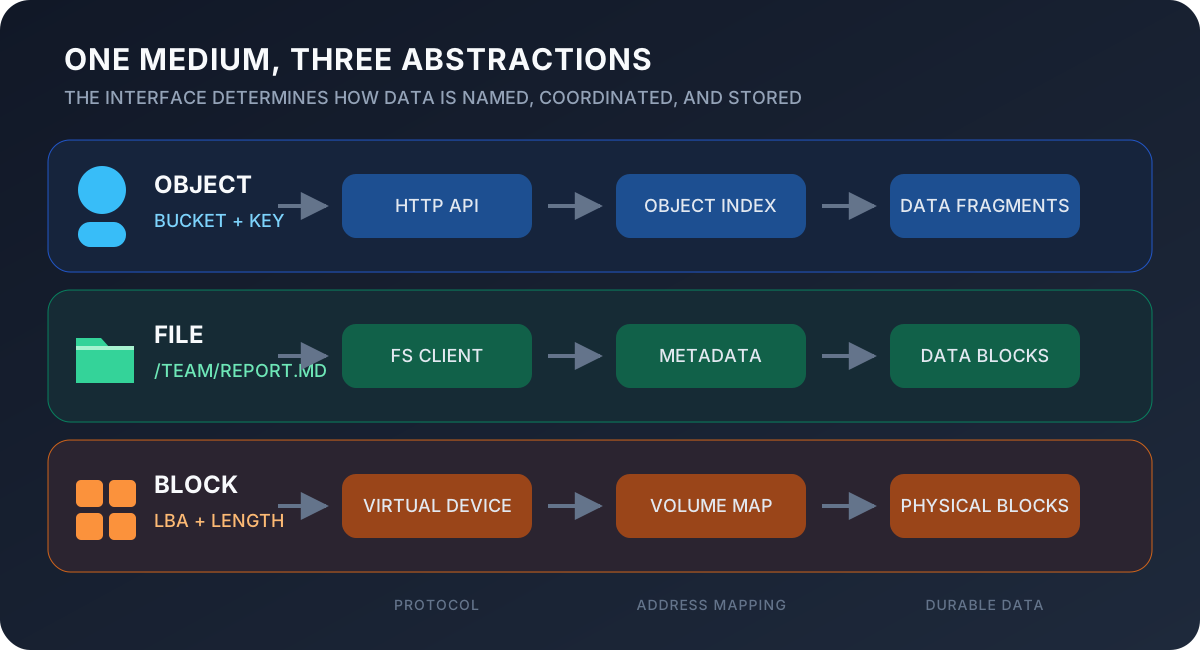
Object storage understands an object and its key. File storage adds directories, names, permissions, and locking. Block storage exposes lower-level logical addresses and leaves file-system semantics to the operating system or database. The higher the abstraction, the more the service manages; the lower the abstraction, the more control—and responsibility—the user retains.
Object storage: retrieve a complete piece of data by key
Object storage keeps each piece of data as an object. An object normally contains:
- The data itself, such as an image, video, archive, or log;
- Metadata, such as its content type, creation time, caching policy, and custom tags;
- A unique identifier, usually called a key.
Applications commonly use an HTTP API or SDK to perform operations such as PUT, GET, and DELETE. The “folders” shown in a management console are often a visual interpretation of key prefixes. For example, images/2026/avatar.png may still be one complete key rather than a file inside several physical directories.
What happens during a write? When a client sends PUT bucket/key, the request commonly passes through authentication and routing first. The service locates the partition responsible for that namespace, assigns an object version and storage locations, and splits a large object into fragments. Checksums travel with those fragments, which are distributed across disks, nodes, or availability zones through replication or erasure coding. Once the service’s durability condition is satisfied, the metadata index can point the key to the new version and acknowledge the request. Exact ordering varies by product, but separating the name-to-location mapping from the data is the central idea.
A read follows the path in reverse: the key identifies an object version and its fragment locations; one or more nodes return the data; checksums verify it before delivery. When a fragment is damaged, background repair can reconstruct it from replicas or redundant fragments. This design scales horizontally because a key can be routed to a partition without requiring unrelated objects to share a directory lock.
This model works well for enormous collections of relatively independent data. A service can distribute objects across many nodes, making capacity expansion and high durability easier without asking users to manage disks or file systems.
Object storage is not a remote disk whose arbitrary bytes can be overwritten at will. Updating an object commonly means uploading it again, while renaming may require copying it to a new key and deleting the old one. Multipart uploads and range reads improve large-object workflows, but the model is still a poor fit for a traditional database data file.
This limitation is not merely a missing feature; it is a deliberate trade-off. Treating an object as a complete version makes checksums, versioning, replication, and failed-request retries easier to reason about. The cost is giving up the ability to overwrite a few bytes in the middle with file-system-like semantics.
Good use cases include:
- Website assets and user-uploaded images or videos;
- Backups, archives, and software packages;
- Logs, data lakes, and machine-learning datasets;
- Large files distributed directly over the internet.
File storage: mount a cloud directory on multiple machines
File storage preserves the familiar hierarchy of directories, subdirectories, and files. Files have names, permissions, and modification times. Through protocols such as NFS and SMB, applications can mount a remote file system and use it much like a local directory.
How does a path become data? When an application calls open("/team/report.md"), the file system resolves /, team, and report.md in sequence. Directory entries map names to inodes or file IDs, while metadata records size, permissions, timestamps, and data locations. After permission and lock checks, the client receives a file handle that subsequent read and write calls use to reach the actual data blocks.
Clients normally cache directory entries, attributes, and file contents to avoid a network round trip for every operation. Leases, locks, version numbers, or invalidation messages then coordinate those caches. This creates an unavoidable tension: more aggressive caching improves reads, but simultaneous writers require more coordination. NFS, SMB, and individual cloud services do not provide identical locking and consistency semantics, so “it mounts successfully” does not mean every shared-write pattern is safe.
Its defining value is not merely that it “stores files”—all three models can hold file contents—but that it provides shared file-system semantics. Multiple cloud instances can access the same hierarchy, and an existing application can often move to the cloud without changing its storage code.
The trade-off is that the system must maintain directories, permissions, locks, and metadata. Metadata operations can become a bottleneck with huge numbers of small files or extreme concurrency. POSIX behavior, locking, and consistency also vary by product, so critical applications should verify the exact guarantees before migration.
The small-file problem follows directly from this model. Creating one million 1 KB files does not merely write about 1 GB of payload; it also performs one million creates, directory updates, permission records, and timestamp changes. Scale-out file systems often separate metadata from data and shard directories or file IDs, but a hot directory can still concentrate work on a small set of metadata nodes.
Typical uses include:
- Shared directories accessed by multiple servers;
- Content-management systems, media production, and team workspaces;
- Home directories, development environments, and enterprise file sharing;
- Legacy applications that depend on local paths and cannot use an object API.
Block storage: give the operating system a “cloud disk”
Block storage divides capacity into fixed-size blocks and presents them to a cloud instance as a raw device. The device knows block addresses, not “orders,” “images,” or “directories.” The operating system can create a file system on it, while a database may manage the blocks through its own storage engine.
What is inside a block request? The essential command can be simplified to “read or write this length starting at this logical block address (LBA).” The cloud platform maintains a volume map that translates the logical range into physical extents on backend nodes. A write may enter a journal or cache and then be copied to other nodes; the platform acknowledges it only after its configured completion condition is met. Thin provisioning allocates backend capacity on first write, while growing a volume primarily extends the logical address map.
The device does not know whether the upper layer is updating a database row or a file. It can report a block operation as complete and expose barriers or flushes, but file-system journals, database WAL, transactions, and crash recovery remain upper-layer responsibilities. If the application does not flush correctly, or a snapshot captures a transaction still in memory, the restored file system or database can be inconsistent even though the block service lost no acknowledged data.
From inside a cloud instance, the result looks much like a local disk. That makes block storage a natural fit for low-latency workloads, in-place updates, and random I/O. VM boot volumes, database data volumes, message queues, and transactional systems with predictable IOPS commonly use it.
The user remains responsible for partitioning, formatting, growing the file system after a resize, and protecting the data. A regular block volume is also commonly attached to one machine at a time. Even when a service supports multi-attach, safe concurrent access requires a cluster-aware file system or application; otherwise, data corruption is likely.
Block snapshots commonly use copy-on-write or redirect-on-write. Creating a snapshot records block mappings instead of immediately copying the whole disk, and later writes preserve or redirect only the changed blocks. This makes snapshot creation fast, but the result is generally only crash-consistent at the volume level. An application-consistent snapshot also requires flushing caches, freezing the file system, or placing the database into an appropriate backup state.
The boundary can be summarized in one sentence:
Object storage delivers objects addressed by key, file storage delivers a shareable directory tree, and block storage delivers disk space for you to manage.
2. How Reliability, Consistency, and Performance Are Built
Several terms are often blurred together in cloud-storage discussions:
| Concept | The question it actually answers |
|---|---|
| Durability | How unlikely is acknowledged data to be lost over time? |
| Availability | If a request arrives now, can the service answer it in time? |
| Consistency | When do different clients observe the same latest state? |
| Atomicity | Does a change appear completely, or can an intermediate state become visible? |
A system can be extremely durable yet temporarily unavailable during a network failure. It can also remain responsive while some clients briefly observe an older version. “The data will not be lost” and “every read sees the latest data” are different guarantees.
Replication and erasure coding. Replication keeps several complete copies. Reads and failover are straightforward, but the capacity cost is high. Erasure coding transforms data into $k$ data fragments and $m$ parity fragments; the original remains recoverable while enough fragments survive. It is more space-efficient, but encoding, reconstruction, and small updates consume additional CPU, network, and disk I/O. Large objects and colder data often suit erasure coding, while latency-sensitive hot data often favors replicas. The choice is not dictated by the words “object,” “file,” or “block,” and one service may use different schemes across storage tiers.
What does a successful write mean? A distributed service rarely waits for every replica before responding. It applies rules based on acknowledgement count, failure domains, journals, and other safeguards. More conservative acknowledgement can reduce post-failure risk at the cost of write latency. Background repair must also keep verifying checksums and restoring redundancy after disks or nodes fail; writing three copies initially does not keep three healthy copies forever.
The interfaces expose different atomicity boundaries:
| Type | A boundary applications can commonly rely on | What should not be assumed |
|---|---|---|
| Object storage | A single-object create or replacement generally appears as a complete version | Multi-object transactions, directory renames, or atomic updates across keys |
| File storage | Protocol-defined file and directory operations, often including locks and atomic rename | Strict POSIX behavior under every client cache or safety for arbitrary concurrent writers |
| Block storage | Completed block operations plus the documented ordering and flush semantics | File or database transaction consistency, which belongs to the upper layer |
Exact guarantees remain product-specific. Many modern object stores, for example, provide strong consistency for single-object operations, but that does not create transactions across several objects.
Performance is not a three-level ranking either. I/O latency roughly combines client processing, network round trips, metadata lookup, queueing, and media access. IOPS measures operations completed per second, while throughput measures bytes transferred per second. Before another service or network limit is reached, a useful approximation is:
$$ \text{throughput} \approx \text{IOPS} \times \text{average I/O size} $$
A database may issue many random 4 KiB or 16 KiB operations and care most about latency and IOPS. A backup or analytics job may move several MiB per operation and care more about throughput. An object request can have higher individual latency while thousands of objects are read in parallel, producing aggregate throughput far above that of one block volume.
| Access requirement | Start with | Why |
|---|---|---|
| Read or write one complete image at a time | Object storage | Simple interface that scales to huge object counts |
| Let multiple servers edit files in one directory | File storage | Native directories, permissions, and shared access |
| Perform many small random database writes | Block storage | Lower latency and fine control by the database and file system |
| Scan petabytes of logs or training data | Object storage | Throughput scales through parallel access to many objects |
| Keep using local file paths | File or block storage | Both can expose a mounted file system without an object-API rewrite |
Finally, durability is not backup. Replicas and erasure coding mainly handle hardware failure; they can faithfully propagate accidental deletion, bad overwrites, and application mistakes. Versioning, snapshots, and cross-region replication each cover part of the risk, but valuable data still needs an independent backup with isolated permissions and a tested restore procedure.
3. Make an Initial Choice in 30 Seconds
An initial decision should consider at least five questions:
- Interface: Does the application use an object API, file path, or raw block device?
- Sharing and concurrency: Is the data private to one host, or do several hosts read and write it simultaneously?
- Access pattern: Are complete objects transferred sequentially, or are small regions updated frequently?
- Semantic requirements: Does the application depend on file locks, atomic rename, transactional flushes, or strict consistency?
- Operational boundary: Who owns growth, file systems, snapshots, backups, and restore drills?
or a self-managed file system?} D -->|Yes| K[Block storage] D -->|Unclear| E[Confirm the interface and access pattern]
Real systems rarely choose only one. An e-commerce platform might place its database on block storage, keep generated files shared by application servers on file storage, and put product images, logs, and backups in object storage. These are not three quality tiers; they are three tools for different jobs.
The most useful rule is simple: do not ask which storage type is “best”; ask which language the application already speaks. If it speaks HTTP APIs, start with object storage. If it speaks directories and paths, consider file storage. If it needs a disk fully controlled by an operating system or database, choose block storage.